这篇文章上次修改于 1209 天前,可能其部分内容已经发生变化,如有疑问可询问作者。 ### 安装Suricata4.0.4并启用PF_RING ##### 0x1 环境 > 操作系统:Centos 7.3 > > suricata版本: Suricata 4.0.4 > > PF_RING版本: 8.2.0 yum安装所需依赖环境: ```shell yum install -y wget epel-release yum -y install gcc gcc-c++ libpcap-devel pcre-devel libyaml-devel file-devel \ zlib-devel jansson-devel nss-devel libcap-ng-devel libnet-devel tar make \ libnetfilter_queue-devel lua-devel PyYAML libmaxminddb-devel rustc cargo \ lz4-devel camke ``` ##### 0x2 安装PF_RING及编译Suricata github下载8.2.0版本:https://github.com/ntop/PF_RING/archive/refs/tags/8.2.0.zip ```shell wget https://github.com/ntop/PF_RING/archive/refs/tags/8.2.0.zip unzip PF_RING-8.2.0 cd PF_RING-8.2.0/kernel make && sudo make install insmod pf_ring.ko ###lsmod查看是否载入 lsmod |grep pf ========== pf_ring 189940 0 ========== cd ../userland/lib ./configure && make && make install cd ../libpcap ./configure && make && make install cd ../tcpdump ./configure && make && make install #编译自带examples cd ../examples && make #使用pfcount统计端口信息 ./pfcount -i eth0 #回显 ./pfcount -i enp2s0f3 Using PF_RING v.8.2.0 Dumping statistics on /proc/net/pf_ring/stats/17300-enp2s0f3.4 Capturing from enp2s0f3 [mac: 28:51:32:10:B8:F6][if_index: 5][speed: 1000Mb/s] # Device RX channels: 8 # Polling threads: 1 ========================= Absolute Stats: [4 pkts total][0 pkts dropped][0.0% dropped] [4 pkts rcvd][724 bytes rcvd] #查看pf_ring信息 cat /proc/net/pf_ring/info ============================================== filename: /lib/modules/3.10.0-514.el7.x86_64/kernel/net/pf_ring/pf_ring.ko alias: net-pf-27 version: 8.2.0 description: Packet capture acceleration and analysis author: ntop.org license: GPL rhelversion: 7.3 srcversion: 91B82BE637549E36F17DC34 depends: vermagic: 3.10.0-514.el7.x86_64 SMP mod_unload modversions parm: min_num_slots:Min number of ring slots (uint) parm: perfect_rules_hash_size:Perfect rules hash size (uint) parm: enable_tx_capture:Set to 1 to capture outgoing packets (uint) parm: enable_frag_coherence:Set to 1 to handle fragments (flow coherence) in clusters (uint) parm: enable_ip_defrag:Set to 1 to enable IP defragmentation(only rx traffic is defragmentead) (uint) parm: quick_mode:Set to 1 to run at full speed but with upto one socket per interface (uint) parm: force_ring_lock:Set to 1 to force ring locking (automatically enable with rss) (uint) parm: enable_debug:Set to 1 to enable PF_RING debug tracing into the syslog, 2 for more verbosity (uint) parm: transparent_mode:(deprecated) (uint) PF_RING Version : 8.2.0 (unknown) Total rings : 0 Standard (non ZC) Options Ring slots : 4096 Slot version : 20 Capture TX : Yes [RX+TX] IP Defragment : No Socket Mode : Standard Cluster Fragment Queue : 0 Cluster Fragment Discard : 0 ============================================== ``` 下载,编译安装Suricata ```shell wget https://www.openinfosecfoundation.org/download/suricata-4.0.4.tar.gz unzip suricata-4.0.4 cd suricata-4.0.4/ LIBS="-lrt" ./configure --prefix=/usr --sysconfdir=/etc --localstatedir=/var \ --enable-pfring --with-libpfring-includes=/usr/local/include \ --with-libpfring-libraries=/usr/local/lib make sudo make install #关键,写入lib变量路径到usrlocal.conf,否则找不到pfring.so echo "/usr/local/lib" | tee --append /etc/ld.so.conf.d/usrlocal.conf sudo ldconfig sudo make install-conf #会连网下载4.X版本的规则 sudo make install-rules suricata --build-info | grep PF_RING PF_RING support: yes ``` 完成后: 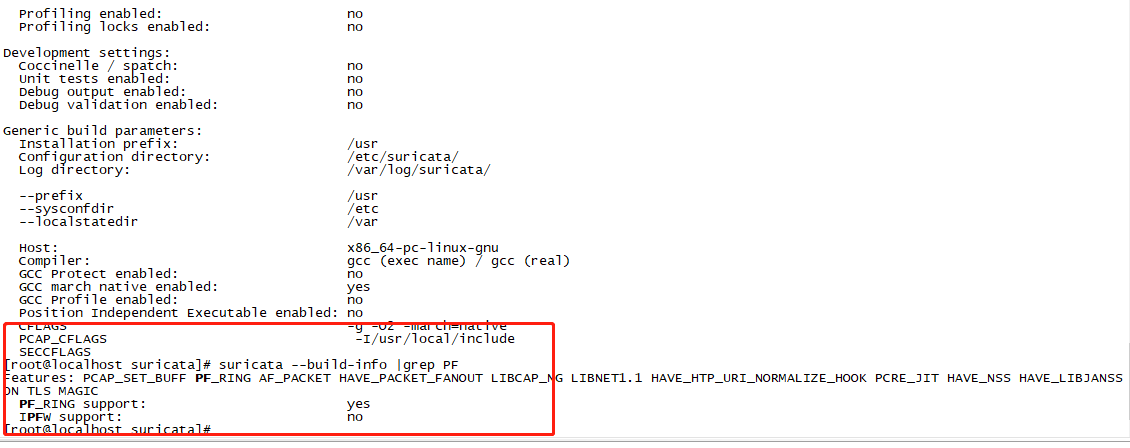 ##### 0x3 一些问题 1.出现PF_RING not enabled.make sure to pass --enable-pfring  2.出现make: execvp Permission denied拒绝访问时 在pf_ring的/userland/lib目录下编译时可能会提示没权限 ```shell #给777权限 chmod -R 777 ./* ``` 3.编译suricata后,执行suricata报错 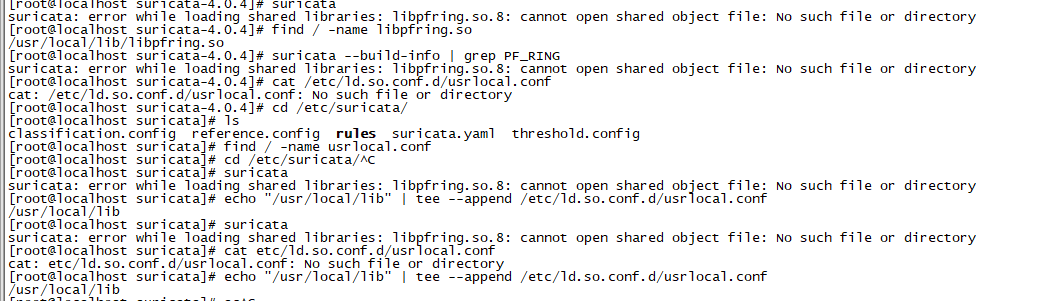 ```shell suricata: error while loading shared libraries: libpfring.so.8: cannot open shared object file: No such file or directory #将pf_ring库路径加入到动态库搜索路径: echo "/usr/local/lib" | tee --append /etc/ld.so.conf.d/usrlocal.conf sudo sudo ldconfig ``` 4.其他的问题 > 暂无
没有评论